
Compare
Video2PPT vs MagicSlides: Which Video-to-PPT Tool Wins?
Video2PPT vs MagicSlides: compare faithful frame extraction with AI-generated presentations, including YouTube input, privacy, editing, exports, and price.

Video2PPT and MagicSlides can both convert video to PowerPoint. The important difference is what happens between the video and the deck. Video2PPT is designed to recover and organize the source video’s real visual moments. MagicSlides can either extract frames directly or use AI to reinterpret the video as a newly structured, newly designed presentation.
That makes this a three-way workflow decision:
- Extract: keep what appeared on screen.
- Reconstruct: turn captured slide visuals into editable PowerPoint elements.
- Regenerate: summarize the video and design a new deck around its ideas.
Video2PPT concentrates on the first two. MagicSlides spans direct extraction and AI regeneration.
Review note: This comparison was fact-checked on August 1, 2026 against each product’s current converter, pricing, documentation, marketplace listing, and privacy policy. Video2PPT publishes this comparison. Features and prices can change, so verify the live product before purchasing.
Quick answer
| Your goal | Better fit | Why |
|---|---|---|
| Preserve the exact slides, charts, or UI shown in a video | Video2PPT | Its default workflow is anchored to real frames from the source timeline. |
| Turn a video’s ideas into a polished new narrative deck | MagicSlides AI mode | It can summarize, reorganize, illustrate, and template the content. |
| Quickly extract frames from a local video without signing in | Either | Both advertise browser-local direct conversion for supported local formats. |
| Record a screen or webinar and extract slides | Video2PPT | Screen recording is built into its input workflow. |
| Work inside Google Slides or use a broad integration ecosystem | MagicSlides | It offers a Google Slides add-on plus Chrome, Figma, ChatGPT, Zapier, API, and other surfaces. |
| Process long or repeated video jobs offline | Video2PPT Desktop | The current lifetime offer is centered on local offline use and repeat conversion. |
Our verdict: Video2PPT is the more focused choice for source-faithful video conversion. MagicSlides is the stronger choice for AI-assisted presentation authoring. If you only need quick frame extraction, test both direct modes with the same file and compare cleanup time.
The old “extraction vs generation” comparison is no longer enough
It would be inaccurate to say MagicSlides only starts from prompts or documents. Its current video-to-PPT tool presents two paths: direct upload for frame extraction and an AI mode that creates structured slides from video content. Its wider product also accepts topics, text, PDF, DOCX, URLs, audio, local video, and YouTube.
The real difference is the product’s center of gravity:
- Video2PPT starts with a video and asks which real moments belong in the exported deck.
- MagicSlides starts with source material and asks what presentation should be created from it.
Those workflows can produce very different slides from the same lecture. One may preserve the lecturer’s original diagram; the other may replace it with a summarized title, bullet points, and a new visual.
Product and workflow screenshots
Video2PPT: source-first extraction
The Video2PPT cover screenshot above shows how its main converter makes video ingestion the primary action. Local files, online links, and screen recording feed into a frame review and export workflow. Its public page also advertises batch processing, transcription, editable PowerPoint, and a desktop offline option.
MagicSlides: AI-first presentation creation
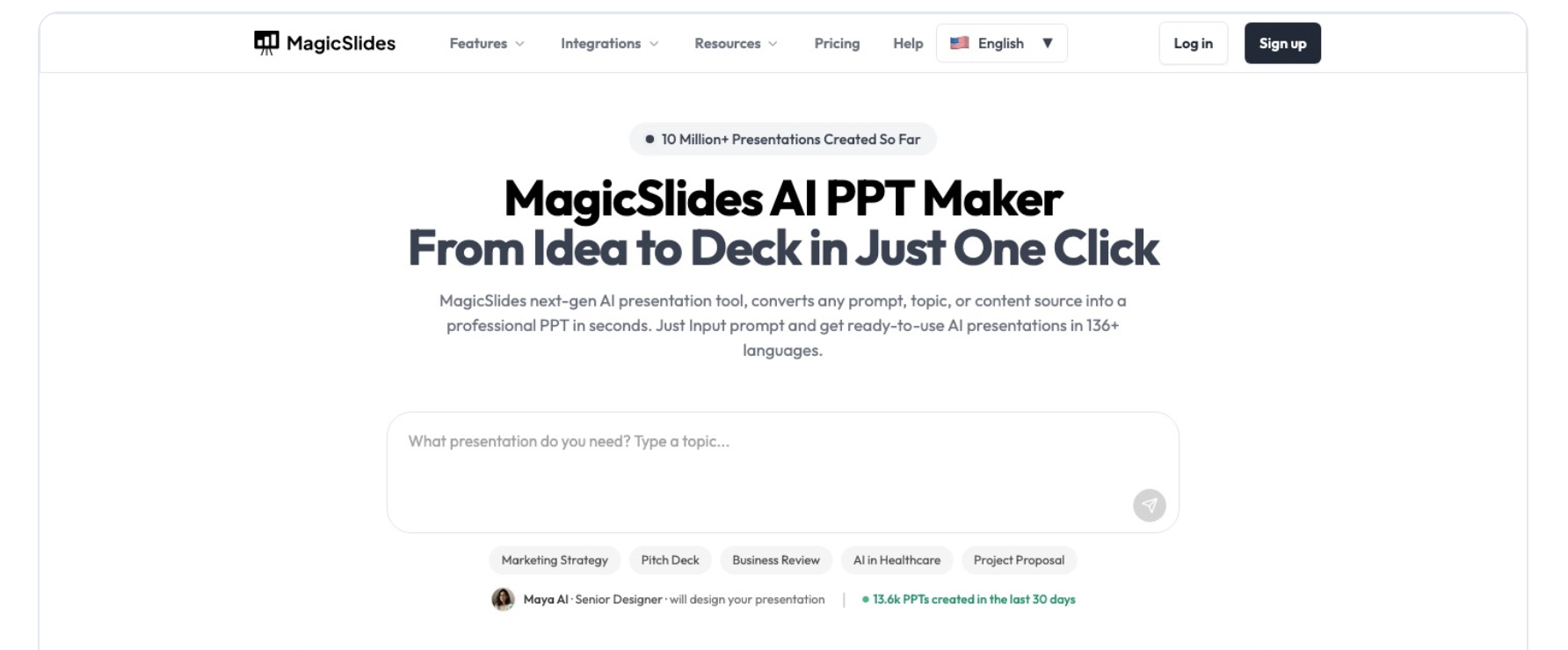
The MagicSlides homepage foregrounds its AI-first positioning: users can describe the presentation they need and let the product design a new deck. Its dedicated video tool separately offers Direct Upload and With AI paths. Direct mode extracts frames from supported local files; AI mode interprets the content and generates presentation-ready slides.
Side-by-side feature comparison
| Capability | Video2PPT | MagicSlides |
|---|---|---|
| Core product focus | Video-to-slide extraction, review, and reconstruction | AI presentation creation from many source types |
| Local direct extraction | Yes, for the local-processing workflow | Yes, for supported formats in Direct Upload mode |
| AI-generated deck from video | Not the primary workflow | Yes |
| Preserve original visual frames | Primary design goal | Available in direct mode; not the goal of AI mode |
| Screen recording | Built-in input | Not presented as the primary converter input |
| YouTube / online video | Yes | Yes |
| Batch conversion | Advertised | API/automation options exist, but the consumer UI is creation-oriented |
| Offline desktop use | Offered with the desktop/lifetime workflow | Core AI and Google integrations require an online service |
| Google Slides workflow | Export compatibility is advertised | Native Google Slides add-on and account-based workflow |
| Design systems and templates | Secondary to source fidelity | Major product focus, with templates, presets, and AI editing |
| Broader integrations | Desktop and Chrome extension are promoted | Google Slides, Chrome, Figma, ChatGPT, Telegram, Zapier, API, and more |
How the outputs differ
Video2PPT: the video remains the visual source of truth
For a recorded class or demo, Video2PPT tries to keep the actual slide, chart, code window, or product interface. The exported deck therefore inherits the strengths and weaknesses of the recording: if the source is sharp, the captured page can be sharp; if the source is blurry, no template can restore details that were never recorded.
Video2PPT’s editable workflow claims to recreate text, shapes, and layouts so the result can be adjusted in PowerPoint. That is useful when the desired output is “the original deck, recovered as closely as possible.” Always test small labels, charts, equations, and unusual fonts, because those are the hardest elements to reconstruct reliably.
MagicSlides AI mode: the video becomes research material
MagicSlides can transcribe or analyze the source, identify themes, choose a structure, and generate new slides using templates and AI visuals. This is useful when the desired output is “a clear presentation about this video,” not “the exact presentation shown in this video.”
Regeneration creates new risks. A concise deck may omit an important qualification, simplify a chart, add a generic image, or state a model-generated claim that was not in the source. Treat the result as a draft: check every number, quotation, attribution, and recommendation against the video.
MagicSlides direct mode: the area of real overlap
MagicSlides’ direct mode says supported local videos can be processed in the browser without upload. The current tool lists MP4, MOV, AVI, and WebM in its upload interface, a 500 MB maximum, and says MP4/MOV/WebM frames are captured locally. This puts it in direct competition with Video2PPT for simple frame-to-deck jobs.
The practical comparison is therefore not a feature checkbox. It is the quality of frame selection, duplicate removal, manual control, export editability, and cleanup time.
Privacy and data flow
Privacy depends on the mode you choose.
Local file, direct extraction
Video2PPT’s privacy policy says source files, frames, edits, and exports stay on-device in Local Processing and Desktop Offline Mode. MagicSlides’ direct converter says supported files are processed in the browser without upload. These are the lowest-exposure paths for both products.
Online video or AI generation
Online links cannot be processed entirely from a local file that never leaves your control; a service must retrieve or analyze the remote source. Video2PPT says optional online-link and clearly labeled online features may send submitted content or links off-device.
MagicSlides’ privacy policy says it collects content submitted or generated in the app and may use service providers for hosting, storage, analysis, and support. Its Google Slides add-on also requests authorized Google account scopes to create or edit the content the user selects.
Expert recommendation: use local direct mode for confidential recordings when it meets the output requirement. If you need AI generation, obtain permission to send the material to an online AI service and review the provider’s current retention and deletion terms.
Pricing as of August 1, 2026
Public pricing changes frequently. The figures below are the visible US-dollar offers during this review and may exclude taxes, regional pricing, usage-based AI credits, or promotions.
| Product and plan | Public price | What matters for this comparison |
|---|---|---|
| Video2PPT Free | $0 | Up to 10-minute videos; 3 conversions per month |
| Video2PPT Pro | $10/month | Unlimited video duration; 100 conversions, 100 editable PowerPoint pages, and 600 transcription minutes per month |
| Video2PPT Lifetime | $129 one time (promotional price shown) | Local desktop use with an unlimited-use positioning |
| MagicSlides direct converter | Advertised as free, no sign-in | Local frame extraction for supported files; current page shows a 500 MB maximum |
| MagicSlides Premium | $29/month | 70+ templates, 150+ design presets, 50+ slide support, AI editing, and PPTX/PDF/PNG/JPG/HTML exports |
| MagicSlides Premium Plus | $34/month | Premium features plus higher model credits and additional AI/editor capabilities |
These plans are not priced around the same value. Video2PPT charges primarily for video-processing volume, editable output, transcription, and offline/repeat use. MagicSlides charges for a broader AI creation suite, models, templates, design systems, and integrations.
If your only task is extracting frames, compare the free direct workflows before paying. If your task includes story structure, visual redesign, brand systems, and AI editing, MagicSlides’ broader subscription may justify its higher monthly price.
Which workflow fits your project?
Recorded lecture with the original slides unavailable
Start with Video2PPT. The original diagrams and equations are likely more valuable than a rewritten summary. After recovering the visual deck, create a separate summary only if students need one.
Product demo or software tutorial
Use Video2PPT when the real interface must appear in the deliverable. AI-generated substitutes can invent controls or show an outdated UI. A source-faithful frame is safer for training and support documentation.
YouTube essay turned into a conference presentation
Use MagicSlides AI mode when the video has strong ideas but no reusable slide visuals. The goal is a coherent new talk, so narrative structure and design matter more than frame fidelity.
Sales call turned into a client deck
Use MagicSlides AI mode for a first draft, then verify every customer fact and remove confidential or speculative material. If the call includes a live product demo that must be documented accurately, extract those UI moments separately with Video2PPT.
High-volume internal archive
Use Video2PPT Desktop when the archive requires repeated local conversion, predictable source fidelity, and minimal cloud exposure. Run a small batch first to validate device performance and export consistency.
A fair five-part test
Run the same copyright-cleared 10–15 minute video through Video2PPT, MagicSlides Direct, and MagicSlides AI. Score each workflow separately:
| Test | What to measure |
|---|---|
| Coverage | Important visual moments or ideas included |
| Noise | Duplicate, transitional, blank, or irrelevant slides |
| Fidelity | Accuracy of charts, labels, UI, quotations, and numbers |
| Editability | Text and objects that can actually be changed |
| Cleanup time | Minutes until the deck is safe to share |
Do not combine those measurements into one unexplained “quality score.” Direct extraction can win fidelity while AI generation wins narrative clarity. The correct winner depends on the deliverable.
Limitations of this comparison
This review verifies public product capabilities, pricing, and privacy statements. It does not claim that every file format follows the same local-processing path, and it does not publish invented benchmark numbers. Video resolution, audio quality, language, animation speed, and slide density can materially change results.
For important work, export one sample deck and open it in the exact destination app—Microsoft PowerPoint, Google Slides, or another editor—before buying a long-term plan.
FAQ
Can MagicSlides convert a video to PPT?
Yes. MagicSlides currently offers both direct video-to-PPT conversion and AI video-to-presentation generation. It also supports YouTube as an input in its wider product and Google Slides add-on.
Does MagicSlides preserve the original video frames?
Its Direct Upload mode is intended for frame extraction. Its AI mode creates newly structured slides, so visual fidelity to the original frame is not the primary goal.
Which is better for YouTube to PPT?
Choose Video2PPT when you want the video’s actual visual moments. Choose MagicSlides AI when you want a summarized and redesigned presentation based on the YouTube content.
Which is more private?
For supported local files in direct mode, both advertise browser-local processing. Video2PPT also offers a desktop offline workflow. Online-link retrieval and MagicSlides AI generation should be treated as online processing.
Which is better for Google Slides?
MagicSlides has the tighter authoring integration because it offers a native Google Slides add-on. Video2PPT is the better starting point when the priority is extracting source-faithful video frames before moving the result into a slide editor.
Can I use both tools together?
Yes. Extract an evidence-grade visual deck with Video2PPT, then use MagicSlides to create a separate audience-facing narrative. Keep the source-faithful archive so AI-generated claims and visuals can be checked.