
Compare
Video2PPT vs Vizle (Govizle): Video-to-PPT Comparison
Video2PPT vs Vizle: compare frame extraction, transcripts, privacy, PPT/PDF exports, limits, and pricing to choose the right video-to-slides tool.

Video2PPT and Vizle both turn videos into slides, but they optimize the result for different jobs. Video2PPT is the better fit when the video’s actual visuals are the source of truth and you want to review, keep, and export those frames. Vizle is the better fit when you want a compact reading document that can combine key screenshots with spoken text.
There is more overlap than either description suggests. Both products can extract visual moments, both offer PPT/PDF workflows, and both now have a local-processing option. The useful question is not “Which one converts video?” but “What should the converted file preserve?”
Review note: This comparison was fact-checked on August 1, 2026 against each product’s public converter, pricing, terms, and privacy pages. Video2PPT publishes this comparison. Features and prices can change, so confirm plan details before purchasing.
Quick answer
| Your priority | Better fit | Why |
|---|---|---|
| Preserve the slides or UI exactly as shown in a video | Video2PPT | Its workflow is centered on extracting, reviewing, and exporting real visual frames. |
| Read a lecture as screenshots plus spoken text | Vizle Premium | Vizle explicitly offers PPT/PDF documents with side-by-side transcripts. |
| Manually choose every screenshot without uploading the video | Vizle Composer | Composer processes the video locally and gives you a pick-and-remove workflow. |
| Record a webinar or demo and turn it into slides | Video2PPT | Screen recording is a first-class input alongside files and online links. |
| Process many videos or work offline repeatedly | Video2PPT | Batch processing and a desktop lifetime option are part of its current product offer. |
| Buy a small number of conversions without a subscription | Vizle | Its public plans are sold as pay-as-you-go credit packs. |
Our verdict: choose Video2PPT for a visual reconstruction workflow; choose Vizle for a video-to-reading-document workflow. If neither description matches your goal and you instead want AI to rewrite a video into a newly designed deck, read our Video2PPT vs MagicSlides comparison.
The key difference: reconstruct vs package
Video2PPT treats the video timeline as the primary source. The user extracts presentation-like frames, reviews them, removes unwanted moments, and exports the selected material. This approach suits lectures, product demonstrations, software tutorials, and webinars where the original chart, slide, or interface matters.
Vizle describes itself as a media reader. Its standard web workflow captures key visual moments and can add spoken text, then packages the result as a PDF or PPT. That makes the output useful for studying, searching, printing, and annotating. Vizle Composer adds a separate local, hands-on workflow for choosing screenshots yourself.
That distinction affects almost every buying criterion:
- Video2PPT asks: Which on-screen moments should become slides?
- Vizle asks: How can this video become a compact document I can read?
Product and workflow screenshots
Video2PPT: conversion starts with the video source
The Video2PPT cover screenshot above puts the source options at the start of the workflow: local file, online video, or screen recording. For local files, its privacy policy says the source video, extracted frames, edits, and exports remain on the device when Local Processing or Desktop Offline Mode is used. Online links and explicitly online features are a separate data path and may send the submitted content or link off-device.
Vizle: conversion starts with a URL or uploaded file
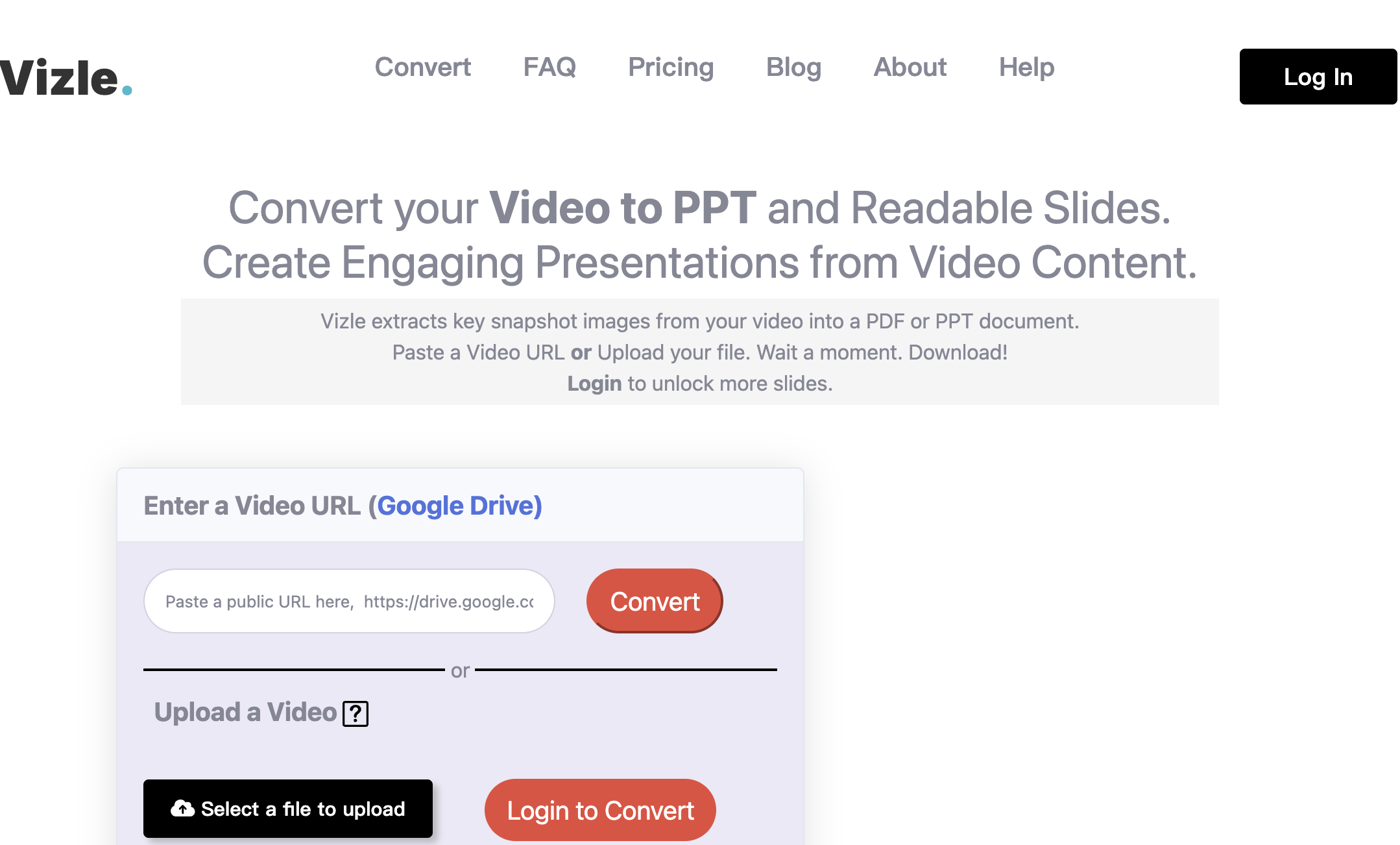
Vizle’s standard video-to-PPT converter accepts a public URL or uploaded file, then exposes slide preview, PPTX, and PDF options. The same page currently shows a 512 MB upload limit before login and points privacy-sensitive users to Vizle Composer, which says videos are processed locally and lets the user select screenshots manually.
Side-by-side feature comparison
| Capability | Video2PPT | Vizle / Govizle |
|---|---|---|
| Main conversion model | Extract and review visual frames from the timeline | Package key screenshots, with optional spoken text, into a document |
| Local file processing | Browser-local workflow; desktop offline mode is also offered | Local processing is available through Vizle Composer |
| Standard web input | Local file, online video link, screen recording | Public URL or uploaded file |
| Screenshot control | Review extracted moments and keep the frames you need | Composer offers explicit preview, select, copy, and remove controls |
| Transcript workflow | Timestamp-aligned transcription and DOCX-related workflows are advertised | Side-by-side English transcripts are listed on the Premium plan |
| PPT and PDF | Yes | Pro and Premium include both; Basic is PDF-only |
| Screen recording | Yes | Not presented as a primary standard input |
| Batch processing | Advertised for the web/desktop workflow | Offered for custom business requirements |
| Offline use | Desktop app is sold for local offline use after setup | Composer is browser-local; an offline desktop product is not the main offer |
| Pricing model | Free tier, monthly Pro, and lifetime purchase | Pay-as-you-go credit packs plus custom business plans |
Output fidelity and editability
“PPT output” can mean very different things. A PowerPoint file may contain full-slide screenshots, separate editable text and shapes, or a mixture of both. Buyers should test the exact export they need rather than treating the .pptx extension as proof of editability.
Video2PPT’s current product page says its editable PowerPoint workflow recreates text, shapes, and layouts while keeping the original slide appearance close to the video. That is most valuable when you need to correct text or reuse the captured slide—not merely present a screenshot.
Vizle’s standard product language is more explicitly screenshot-oriented: it captures key snapshot images and gathers them into PPT or PDF documents. Its public pricing page lists PPTs with editable text under Custom Business, not as a blanket promise for every self-service plan. If editable objects are essential, ask Vizle whether the specific plan and conversion mode produce editable text or image-only pages.
An expert test for either product
Use one copyright-cleared, 10–15 minute sample containing:
- A title slide and section divider.
- A dense chart with small labels.
- A short animation or build sequence.
- A live software demonstration.
- A speaker-only segment with no slide.
Then record four numbers: important moments missed, duplicate/junk pages, text corrections required, and minutes of cleanup. Those measurements are more useful than a generic “AI accuracy” claim.
Privacy: compare workflows, not slogans
Both products offer a local route, but neither should be described with an unconditional one-line privacy claim.
Video2PPT
The local browser and desktop workflows keep source files on the device according to Video2PPT’s policy. Optional online-link processing, public sharing, and clearly labeled online features may transmit content or a link. For confidential material, use a local file in Local Processing or Desktop Offline Mode and avoid online services.
Vizle
Vizle’s standard converter accepts an upload or public URL, so that path should be treated as an online service. Its terms say private conversion data is protected during processing and deleted after conversion, with converted content retained only as long as needed for delivery and support. Vizle Composer is the separate local option and states that the source video is processed locally.
Practical recommendation: before converting regulated, client-confidential, or unreleased material, document which mode you used—not just which brand. “Local file in local mode” and “YouTube/Drive URL sent to an online converter” are different risk profiles even inside the same product.
Pricing and limits as of August 1, 2026
Prices change frequently. The table below reflects the public US-dollar offers visible during this review and excludes taxes, promotions, and custom contracts.
| Product and plan | Public price | Relevant published limits |
|---|---|---|
| Video2PPT Free | $0 | Up to 10-minute videos; 3 conversions per month |
| Video2PPT Pro | $10/month | Unlimited video duration; 100 conversions and 100 editable PowerPoint pages per month; 600 transcription minutes |
| Video2PPT Lifetime | $129 one time (promotional price shown) | Desktop-focused unlimited conversion, editable PowerPoint, and transcription offer |
| Vizle Basic | $5 for 5 credits | PDF only; up to 30 minutes and 20 screenshots per video |
| Vizle Pro | $10 for 10 credits | PDF and PPT; up to 2 hours and 200 screenshots per video; no transcripts |
| Vizle Premium | $18 for 10 credits | PDF and PPT; transcript support; up to 600 screenshots per video |
Vizle counts one credit for every 30 minutes of video on Pro and Premium, with a minimum of one credit per video. A two-hour file can therefore consume multiple credits. Video2PPT’s monthly plan is easier to predict for recurring volume, while Vizle’s credit packs can be economical for occasional jobs.
Do not compare only the headline price. Estimate your monthly cost using video duration, number of files, required screenshot density, transcript needs, and cleanup time.
Which one should you choose?
Choose Video2PPT if
- The original slide, chart, or software UI must remain visually recognizable.
- You convert screen recordings as well as uploaded or online videos.
- You want a review workspace before exporting.
- You process video repeatedly and value batch or offline desktop workflows.
- A monthly or lifetime purchase fits better than per-video credits.
Choose Vizle if
- Your main goal is to read and study a long video as a compact document.
- Side-by-side screenshots and spoken text are more useful than reconstructing slide objects.
- You want to purchase a small pay-as-you-go credit pack.
- You prefer manually selecting screenshots in a local browser workflow.
- You need a custom business service for a large managed conversion batch.
Consider a two-step workflow if
You may want two deliverables from the same source: an archival deck that preserves what appeared on screen, and a study document that combines visuals with speech. In that case, use Video2PPT for the visual archive and a transcript-oriented workflow for the reading copy. Do not force one export to serve both purposes if clarity matters.
Limitations of this comparison
This review verifies public product capabilities, plan terms, and data-path claims. It does not publish a synthetic winner score because output quality depends heavily on video resolution, slide transition speed, speaker layout, and the selected capture settings. We also did not submit private customer media to either service.
For a fair trial, use the same source file, the same target slide count, and the same definition of “important moment.” Keep the original video so missed content can be audited.
FAQ
Is Govizle the same product as Vizle?
Yes. Govizle is the domain and Vizle is the product name used across the current site and documentation.
Does Vizle convert video to PowerPoint?
Yes. Vizle Pro and Premium list PPT and PDF generation. The Basic plan is PDF-only, and the standard converter page exposes a PPTX download path.
Can Vizle process a video without uploading it?
Yes, through Vizle Composer. Composer says the source video is processed locally and gives you manual control over the selected screenshots.
Does Video2PPT upload my local video?
Not when you use Local Processing or Desktop Offline Mode, according to Video2PPT’s privacy policy. Online-link processing and other clearly labeled online features may send submitted content or links off-device.
Which tool is better for lecture notes?
Vizle Premium is the more direct fit when you want screenshots beside an English transcript. Video2PPT is the better fit when recovering the lecturer’s actual slides is the priority.
Which tool is better for editable PowerPoint slides?
Start with Video2PPT if editability is central to the purchase. Vizle’s self-service language emphasizes screenshot documents, while editable text is explicitly listed for Custom Business. Test one export before committing either way.