
How to Convert Online Video to PPT
Convert supported online videos such as YouTube lessons, Bilibili videos, webinars, and public training recordings into slide decks, PDF notes, and study materials.
Best for
Best for public video links where the visual timeline matters: lectures with slides, software tutorials, product demos, coding walkthroughs, webinars, and online courses.
Convert YouTube to PPTProduct screenshots
These screenshots are captured from real Video2PPT product pages so the guide is grounded in the current workflow UI.
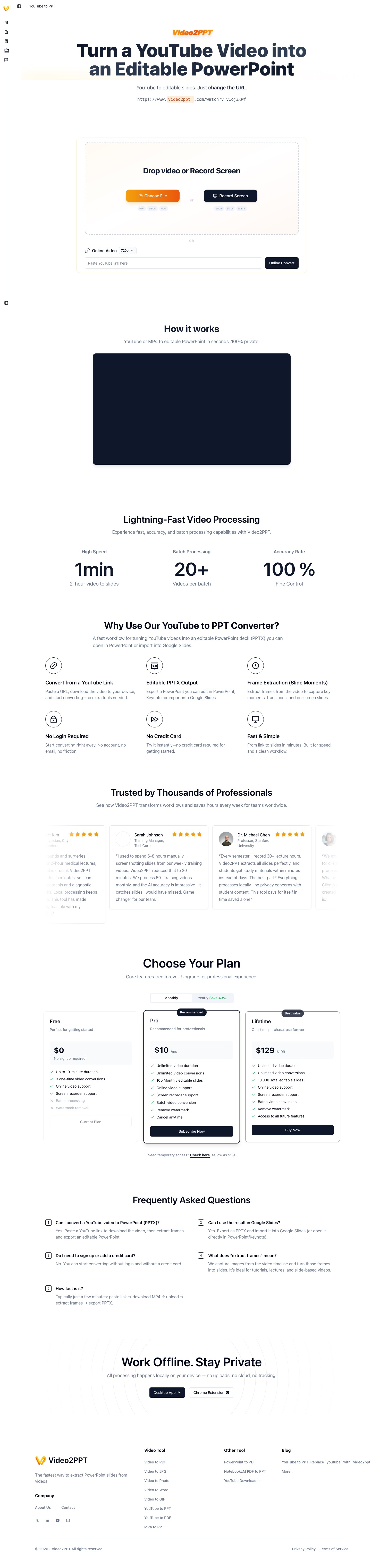
Online video workflow
The YouTube to PPT workflow used as the closest public surface for online video conversion.
GIF walkthrough placeholder
These placeholders mark the exact workflow moments that should become short product GIFs.
GIF slotGIF placeholder: paste link, process task, resample
Replace this image with a GIF showing a YouTube URL submission, extraction task progress, generated slides, and the resample control.
Step-by-step workflow
- 1Copy a supported online video URL, such as a public YouTube or Bilibili video.
- 2Paste the link into Video2PPT and let the online extraction service create a processing task.
- 3Wait while the task downloads or samples the source, prepares video frames, and exposes the result to the slides workspace.
- 4Use the resample or density controls when the first pass is too sparse or too noisy.
- 5Review the generated frames with transcript context when available, then export the selected slides as PPTX, PDF, or related formats.
In-product details
Source routing
The code has explicit online source routing for YouTube and Bilibili, with route bases for slides-yt and slides-bili workspaces.
Task lifecycle
Online extraction uses task APIs for status, result, single-frame access, and resampling, so the user can keep working without manually downloading the video first.
Fallback path
If a link cannot be processed because of platform restrictions, the practical fallback is to use a permitted local recording or a local video file upload.
Choose the right source video
Online video conversion is most useful when the video contains slides, diagrams, product screens, code, or teaching boards. For casual vlogs or audio-heavy interviews, transcript-first output is usually more useful than a slide deck.
What happens after the link is submitted
The app routes online sources into dedicated slide workspaces such as YouTube and Bilibili flows. The frontend tracks task status, loads extracted frames, supports incremental frame access, and allows resampling from the workspace when the initial capture misses important visual moments.
Respect access and copyright limits
Use videos you are allowed to process. Private, region-restricted, login-only, age-restricted, or DRM-protected videos may fail and should not be treated as reliable sources for conversion. The same limitation applies to competitor products that depend on remote media access.
Turn the output into study material
After extraction, use the PPT as a visual outline and the transcript as context. This combination is especially useful for students, researchers, teachers, support teams, and course creators who need a searchable reference from a long recording.
Limitations and quality checks
- Source clarity matters: small text, fast scrolling, motion blur, or camera-only footage can reduce slide quality.
- Most video-derived slides preserve visuals as images; editable text reconstruction requires a separate OCR or editable-PPT workflow.
- Review the extracted frames before export so repeated transitions, login screens, and irrelevant moments do not become final slides.
FAQ
Can I convert YouTube videos directly?
Yes, supported public YouTube links can be processed through the online video workflow. Bilibili-style source routing also exists in the product for supported Bilibili videos.
Why do some online videos fail?
Failures usually come from login restrictions, region restrictions, unavailable media streams, network limits, platform blocking, or videos that require user-specific access.
Should I use online conversion or local upload?
Use online conversion when you only have a public link. Use local upload when you already own the recording file or need more control.
Can I adjust the extracted frames after the first pass?
Yes. The online slides workspace includes controls for reviewing frames and, for supported tasks, resampling when the first extraction is too sparse or too dense.