
Video2PPT vs Gamma
Compare Video2PPT with Gamma for extracting slides from existing videos versus creating new AI-designed presentations, documents, websites, and visual content.
Verdict
Choose Video2PPT when the original recording is the source of truth and the goal is to recover real visual moments. Choose Gamma when you need to create a new designed deck, page, or document from a prompt or outline.
- Video2PPT is built around extracting visual and transcript context from existing videos.
- Gamma is strongest when its primary workflow matches your source material and output target.
- The right choice depends on input type, output fidelity, editing needs, and cleanup time.
Evidence reviewed from product pages
This comparison is based on the public product surfaces reviewed with Playwright screenshots: Video2PPT's home and workflow pages, plus Gamma's public marketing or product pages. The goal is to compare actual product positioning, not generic category labels.
Gamma public positioning
The captured Gamma page presents it as an AI design product for presentations, websites, documents, social media, graphics, and API-driven creation.
Video2PPT public positioning
The captured Video2PPT pages emphasize video-to-PowerPoint conversion, local upload, YouTube conversion, screen recording, batch processing, and export workflows.
Comparison implication
This makes Gamma a creation/design comparison, not a direct video extraction comparison. The decision depends on whether the user starts with a recording or a blank narrative.

Video2PPT product surface
Video2PPT's public home page, captured during product research with Playwright.
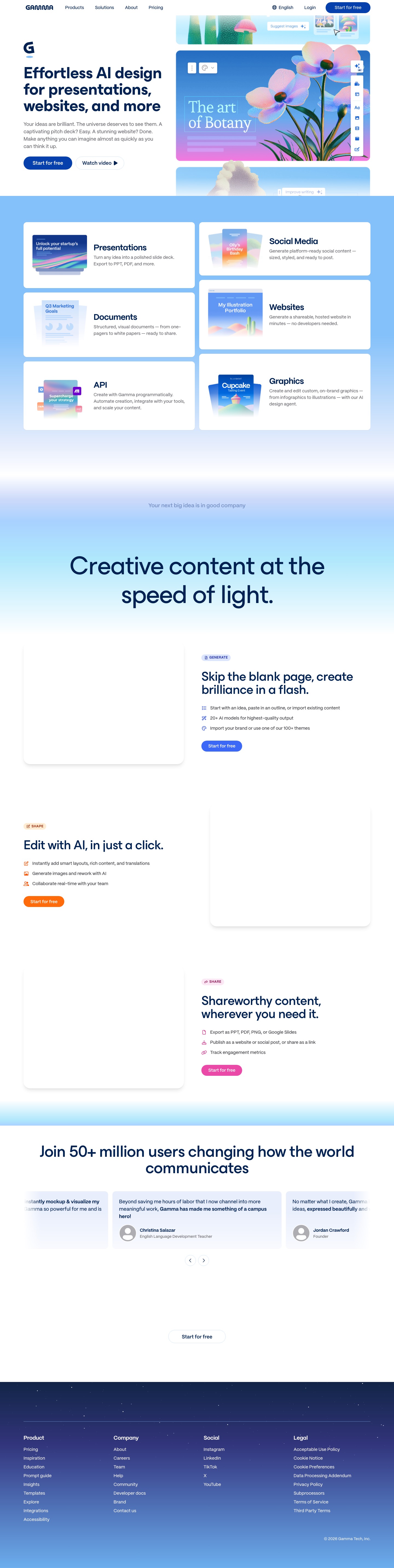
Gamma public product surface
Gamma's public page captured for comparison with Video2PPT's video-first workflow.
GIF walkthrough placeholder
These placeholders mark the product moments that should become short GIFs for stronger search intent coverage and clearer comparison evidence.
GIF slotGIF placeholder: extract evidence before AI redesign
Replace this image with a GIF showing Video2PPT extracting frames from a demo, exporting the slide draft, and using that output as source material for a redesigned deck.
Understanding the workflow and ideal use cases
Video2PPT workflow
Use Video2PPT when the source knowledge already exists in a lecture, webinar, YouTube video, screen recording, product demo, or training video and you need to recover the visual moments as PPT/PDF/Word-style study material.
Convert video to PPTGamma workflow
Use Gamma when you need to create a new presentation, web page, document, social post, or designed narrative from a prompt, outline, brief, or imported text.
Visit GammaProduct-specific details to evaluate
Video2PPT proof point
The product has concrete local, online, YouTube, screen recording, density review, crop, selection, and PPTX/PDF export paths for working from existing video.
Gamma proof point
Gamma should be evaluated as an AI design and narrative creation product, not as a frame-by-frame video extraction workspace.
Fair test
Use a recorded demo as the source. Video2PPT should be judged by captured visual moments and cleanup time; Gamma should be judged by how well it creates a polished new story from the extracted evidence.
Decision criteria
Both tools help create presentation material, but they start from opposite directions
Video2PPT is an extraction workflow: the source material is already inside a video, and the job is to recover useful visual frames, transcript context, and reusable study or training artifacts. Gamma is a creation workflow: it starts from a prompt, outline, document, or idea and turns that into a polished presentation, page, or visual asset.
Choose Video2PPT when the recording is the source of truth
For lectures, webinars, product demos, code walkthroughs, online courses, and meeting recordings, accuracy usually means preserving what appeared on screen. Video2PPT is built for that scenario: it extracts the moments worth keeping instead of asking AI to invent a new deck from scratch.
Choose Gamma when the goal is a new designed story
Gamma is more appropriate when you want a fresh visual narrative: a sales deck, proposal, landing-style page, internal memo, or social media visual. In that case, the source is not a video artifact to preserve; it is a brief that needs to become a designed presentation.
The biggest practical difference is cleanup work
With Video2PPT, cleanup means removing duplicate frames, trimming irrelevant transitions, and deciding which extracted visuals belong in the final deck. With Gamma, cleanup means checking AI-written structure, adjusting visual design, and verifying that the generated story has not changed the meaning of the source material.
A realistic combined workflow
The tools can be complementary. Use Video2PPT to extract source evidence from a recording, export a PPTX or PDF draft, then use those frames and transcript notes as reference material when building a new designed deck elsewhere. This keeps the source grounded while still allowing creative redesign.
Summary
| Feature | Video2PPT | Gamma |
|---|---|---|
| Primary workflow | Extract meaningful slide-like frames and transcript context from existing videos. | Generate new presentations, documents, websites, social media visuals, and graphics from prompts or source content. |
| Starting point | A video file, YouTube link, online video, or screen recording. | A prompt, outline, imported text, brand idea, or content brief. |
| Visual fidelity | Preserves what actually appeared in the source video, including slides, UI states, diagrams, and whiteboards. | Creates a new designed artifact, so the output may restructure or reinterpret the source. |
| Best output | PPT, PDF, Word, image exports, and transcript-supported learning material from recordings. | Polished AI-designed decks, web-style pages, docs, and visual assets. |
| Editing model | Best for cleaning extracted frames, removing duplicates, and exporting evidence-based material. | Best for refining layout, narrative, brand styling, and AI-generated slide copy. |
| Accuracy requirement | Stronger when the goal is to keep close to what the speaker showed on screen. | Stronger when the goal is to create a new persuasive or branded presentation. |
| Weak fit | Not ideal for generating a new pitch deck from a blank prompt. | Not a dedicated workflow for extracting key frames from long video recordings. |
| Best user | Students, teachers, researchers, trainers, support teams, and operators repurposing recordings. | Founders, marketers, consultants, sales teams, and creators making new narrative materials. |
FAQ
Is Gamma a video-to-PPT converter?
Gamma is primarily an AI design and presentation creation tool. It is not positioned as a dedicated video frame extraction workflow for long lectures, webinars, or screen recordings.
Can I use both tools together?
Yes. Extract source material with Video2PPT, then use the result as input or reference when creating a new narrative deck.
Which tool is better for recorded lectures?
Video2PPT is usually the more direct fit because the content already exists visually in the lecture recording. Gamma is better if you want to rewrite that lecture into a new presentation format.
Which tool is better for startup pitch decks?
Gamma is usually closer to the job because pitch decks are narrative and design-first. Video2PPT only makes sense if the pitch content already exists as a recorded demo or webinar that needs to be extracted.
Does Video2PPT create fully redesigned slides like Gamma?
No. Video2PPT focuses on extracting meaningful video moments into presentation artifacts. It is not primarily a prompt-to-design slide generator.
Need a practical test?
Use the same video in both tools and compare slide relevance, missing key moments, transcript usefulness, export format, and cleanup time.